Cheers 
1 Like
Been goofing around with skins in Vital for the last couple of weeks now, I think I’m obsessed 
In my experimentation with the skin interface, I created two generic skins, I call them First Order and Sith. These are works in progress but let me know if theres any clear visual issues.
Since I am a new forums user I can only upload one screenshot, so here is a glimpse at the First Order theme.

You can download them both below.
5 Likes
My no knobs skins crashes vital 1.5
A new one, some details to rule, but its the skin i use.
No_Knobs_multicolor.vitaltheme (110.2 KB)


6 Likes
Thank you for sharing, it looks awesome!
1 Like
Hi, everyone. I made another cool glowing skin! I call this one Acidic. It’s essentially the same as one of my previous skins, Sith, but with a poison-y yellow green color instead of red. Enjoy!

Download can be found here.
6 Likes
The single, full width window for the Vital + Skin Editor is just too wide for my laptop display and resizing to make it fit makes the text in Vital too small for my eyes. Is there any way to have the “Theme Editor” pop-out and still work the same?

4 Likes
Hi guys, Dr. Printer here again. After around 2 weeks i finally finished my latest skin, Monochromatic. You can download it here or down below.


Thank you to the fellas over in the Discord again for helping me find what I needed to finish this skin up. Enjoy!
Direct download:
Monochromatic.vitaltheme (56.6 KB)
5 Likes
so sick! can’t wait to see it when you’re done with it… def want to use that skin
1 Like
 Wow. Nice:+1:
1 Like
Hello again, everyone. I spent some time and fixed Sith, and also made a blue counterpart, Jedi, to drop alongside it. I hope you enjoy.
Sith V2

You can download Sith V2 here, or with the direct download at the bottom.
Jedi

You can download Jedi here, or with the direct download below.
Direct downloads:
Sith V2 (by Dr. Printer).vitaltheme (61.8 KB)
Jedi (by Dr. Printer).vitaltheme (61.8 KB)
10 Likes
Just spent all thanksgiving making my first theme, mostly spent finding the thing I want to change or fixing colors that I messed up. This would be VERY helpful to know, great question.
1 Like
My personal dark theme I have been tweaking for a while, takes some inspiration from pigments, but tried to stay true to the classic Vital colors, though the effects I prefer all one color. All to MY taste, but might appeal to others. Some details that I like, such as the waveforms being solid and visible on osc that are off (but still obviously off)
Vital_After_Hours.vitaltheme (83.9 KB)
image|690x406


8 Likes
That purple gradient is sick! I love how this skin looks overall, nice and minimal while yet still popping out!
1 Like
You can set the opacity to 0 and it will become a completely transparent color.
1 Like
Very nice skin but I’m having trouble with it displaying 3D wavetables. Anybody else having the same issue?
1 Like
Yeah, that dang 3d wave disappears on me, thought it was just me since it was happening on other themes too. Don’t know if I did something wrong, or if it’s just a kink
1 Like


4 Likes
Aloha!
First shot at making some themes for Vital. I really dig Reason and thought someone else might dig these too. Making themes inspired by some of my favorite devices sounded fun. I’m sure I’ll miss a few settings in these but let me know and I’ll be happy to try and fix what I can. 
Reason’s Europa Wavetable Synth:

Reason’s Malstrom Wavetable Synth:

Reason’s Player Devices:

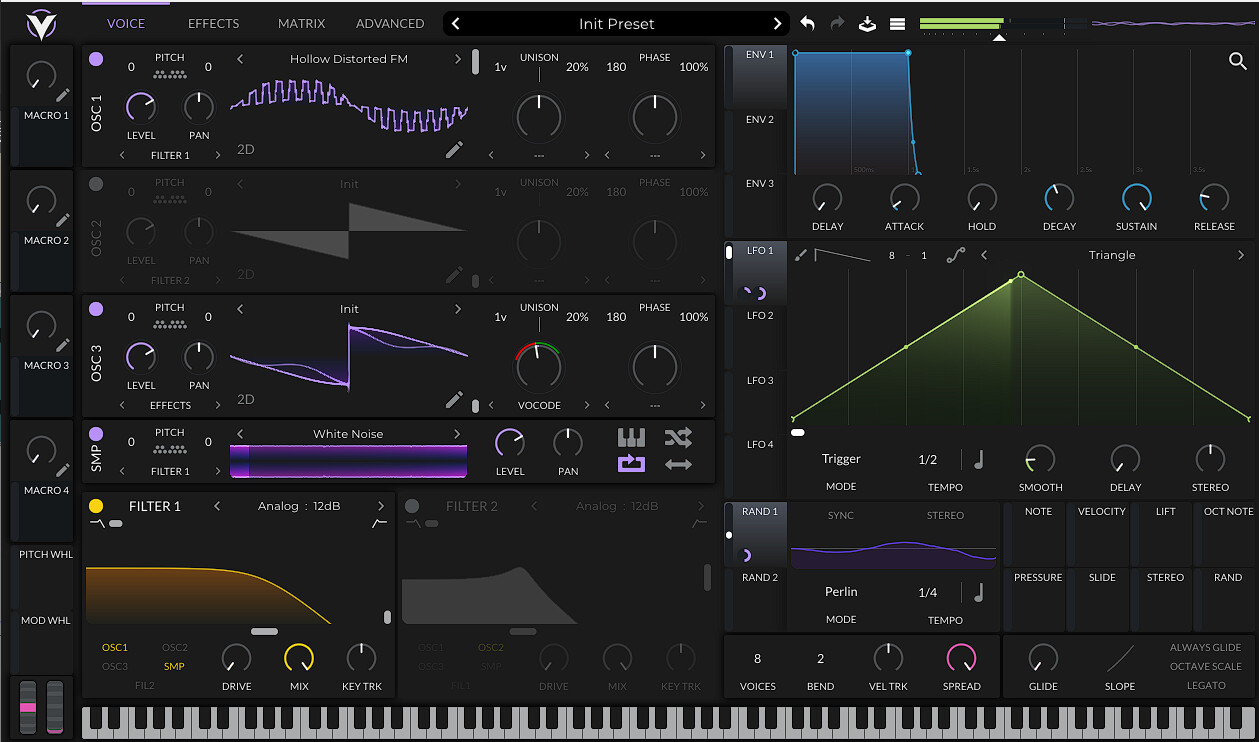
Reason 12 Theme - Europa.vitaltheme (40.9 KB)
Reason 12 Theme - Malstrom.vitaltheme (34.5 KB)
Reason 12 Theme - Player Device.vitaltheme (47.4 KB)
*Consolidated my spam into one post 
6 Likes
You captured those Reason themes well!
2 Likes
Thank you! It was a blast trying to match up the color palette and right vibes for each devices. I’m def gonna try and make a few more in the future
1 Like